

Description
Real-Time AI Subtitles for Web Audio
Overview
The software is designed to deliver real-time transcription of audio from web-based content using advanced voice recognition technology. It converts spoken language from videos, podcasts, live streams, and online meetings into synchronized subtitles directly within the browser environment. This functionality supports a wide range of use cases, including educational sessions, entertainment consumption, language learning, and remote collaboration. The tool is particularly useful for users who require quick access to spoken content without relying on manual note-taking or external transcription services.
Targeted at professionals, students, and general consumers seeking efficient ways to process audio content, the application integrates seamlessly into daily workflows. Its primary value lies in reducing the time and effort required to understand spoken material by providing immediate textual representation. The developer, Aimu AI, focuses on leveraging artificial intelligence to enhance accessibility and productivity across digital platforms. Real-world applications include watching foreign-language films with accurate subtitles, following online lectures in real time, and participating in multilingual web conferences.
Although specific technical details about system integration or background processes are not provided, the software operates as a browser extension, enabling continuous audio capture and processing. It supports multiple languages, including Mandarin, English, Cantonese, Japanese, Korean, Thai, and Shanghainese, with plans to expand language coverage in future updates. The developer did not specify additional system requirements beyond the supported operating systems.
Key Features & Capabilities
- Real-Time Speech-to-Text Conversion – Automatically transcribes audio from web browsers as it plays, enabling instant subtitle generation without delays.
- Multi-Language Support – Recognizes and transcribes speech in multiple languages, including Mandarin, English, Cantonese, Japanese, Korean, Thai, and Shanghainese.
- Customizable Subtitle Styling – Users can adjust font size, color, background, and positioning to match their viewing preferences and website layouts.
- Automatic Line Breaks and Text Integration – The tool intelligently breaks long sentences into readable lines and combines them into a cohesive transcript for better readability.
- Subtitles Export Functionality – Allows users to download and save transcribed text in standard formats for later reference or sharing.
- AI-Powered Accuracy – Utilizes advanced algorithms to achieve high precision in both general and domain-specific speech recognition scenarios.
These features are particularly beneficial in educational settings where students can follow along with lectures in real time, or in professional environments where team members need to review meeting recordings. For casual users, the tool enhances the experience of watching international content by providing accurate, synchronized subtitles. The ability to customize visual presentation ensures compatibility with various websites and viewing conditions. Exporting transcripts enables further use in documentation, research, or content creation workflows.
User Interface, Workflow & Performance
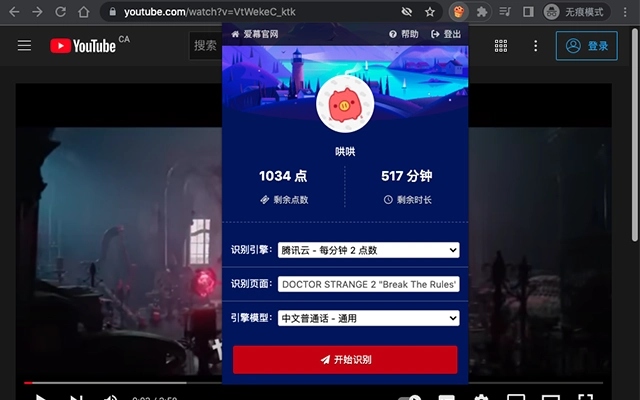
The user interface is designed for simplicity and efficiency, focusing on minimal disruption during audio playback. As a browser extension, it operates in the background with a compact control panel accessible through the browser toolbar. Navigation is intuitive, requiring no complex setup—once installed, the tool begins processing audio automatically when supported content is played.
Workflow efficiency is enhanced by automatic detection of audio sources and immediate transcription initiation. Users can toggle the subtitle display on or off, adjust styling options, and export transcripts with just a few clicks. The tool does not require constant user input, making it ideal for hands-free operation during long-form content consumption.
Performance details were not specified by the developer. However, given its small file size of 1.5 MB and lightweight nature, it is expected to operate with minimal impact on system resources. The developer did not provide information on CPU or RAM usage, nor did they share stability metrics. General software behavior suggests stable operation under normal conditions, but actual performance may vary depending on the browser, device, and audio complexity.
Compatibility & System Requirements
The software is compatible with Windows and Mac operating systems. It functions as a browser extension, meaning it integrates directly into popular web browsers such as Chrome, Firefox, and Edge. The installation size is 1.5 MB, indicating a lightweight footprint that minimizes storage impact.
Exact system requirements were not listed. The developer did not specify minimum hardware specifications, processor speed, or memory thresholds. Compatibility information is limited to the operating systems and browser environment. Users should ensure their browser is up to date to maintain optimal functionality. The software version is 1.0.0, released on March 24, 2025.
Pros and Cons
Pros
- Real-time transcription with high accuracy across multiple languages
- Lightweight design at only 1.5 MB in size
- Customizable subtitle appearance for better visual integration
- Supports diverse use cases: education, entertainment, communication
- Free to use with no licensing costs
- Exportable transcripts for offline reference and sharing
Cons
- Exact system requirements not publicly disclosed
- Performance resource usage details not provided
- Only available as a browser extension, not a standalone desktop app
- Language support limited to specific regions and dialects
- Dependent on browser compatibility and web content accessibility
FAQ Section
Is this software compatible with all web browsers?
The software is designed to work with major web browsers, though specific compatibility details were not provided. It is recommended to use the latest version of your preferred browser for optimal performance.
Is the software safe to use?
Yes, the software is developed by Aimu AI and operates within the browser environment. It does not collect or transmit personal data unless explicitly permitted by the user. For full details, refer to the privacy policy at https://aimu.app/privacy-policy.html.
How often does the software receive updates?
Updates are released as needed to improve accuracy, add language support, and fix bugs. The current version is 1.0.0, with future updates planned based on user feedback and technological advancements.
What type of license does this software use?
The software is free to use under a standard license model. No subscription or payment is required for access to core features.
Can I use this tool offline?
The software requires an active internet connection to process audio and generate real-time subtitles, as it relies on cloud-based AI services for speech recognition. Offline functionality is not currently supported.
Final Thoughts
This AI-powered tool represents a significant advancement in real-time web audio transcription, offering a seamless and accessible solution for users across various domains. Its ability to deliver accurate, multi-language subtitles with minimal setup makes it a valuable asset for students, educators, professionals, and media consumers. The lightweight design and free availability further enhance its appeal, making it accessible to a broad audience.
While some technical details remain unspecified, the core functionality is robust and well-targeted toward improving content comprehension and workflow efficiency. For anyone seeking a reliable, no-cost solution to convert web audio into readable text, this software delivers strong value. The combination of AI accuracy, customization, and export capabilities sets it apart in the growing category of AI-powered productivity tools.
Download Real-Time AI Subtitles for Web Audio now.
Guides & Tutorials for 爱幕 (AiMu) Extension for Chrome
How to install 爱幕 (AiMu) Extension for Chrome
- Click the Preview / Download button above.
- Once redirected, accept the terms and click Install.
- Wait for the 爱幕 (AiMu) Extension for Chrome download to finish on your device.
How to use 爱幕 (AiMu) Extension for Chrome
This software is primarily used for its core features described above. Open the app after installation to explore its capabilities.
User Reviews for 爱幕 (AiMu) Extension for Chrome 0
No reviews found





